Introducing Photo Markup: Turn Site Photos Into Clear Communication
 Chirayu Arya · April 1, 2026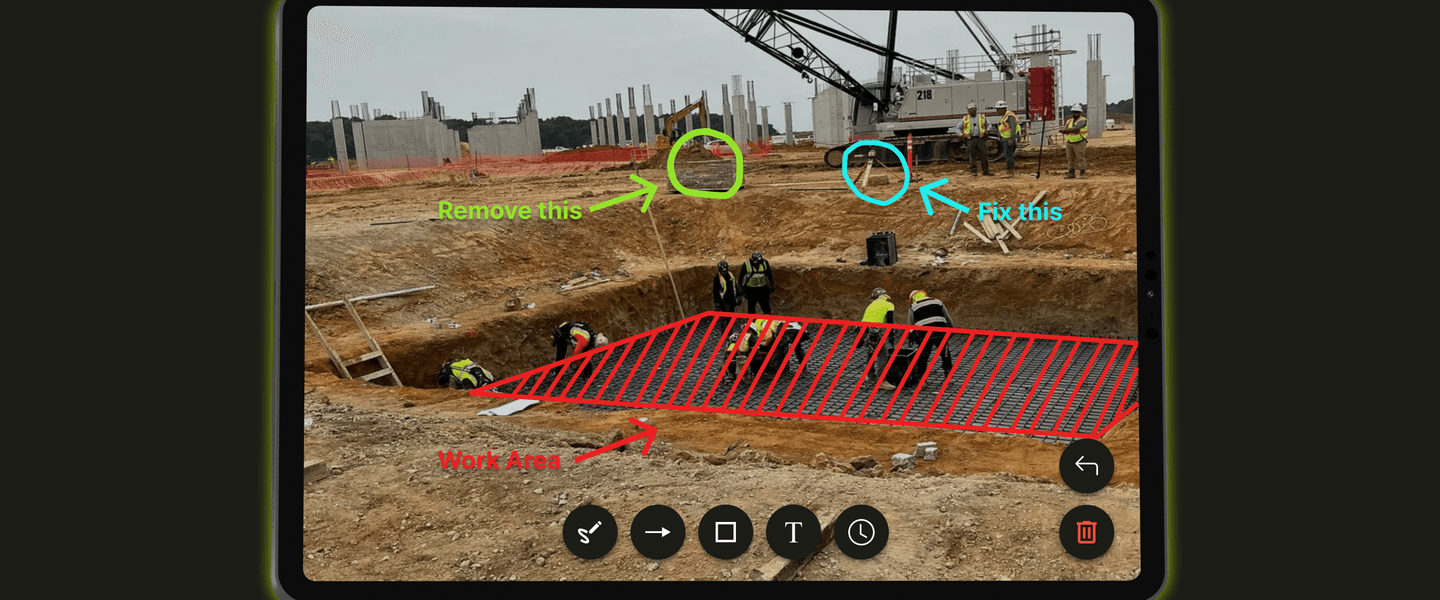
If you’ve ever sent a construction photo to a client or teammate, you’ve probably heard the question:
“What exactly am I looking at?”
It’s one of the most common frustrations in construction documentation.
You take a photo to capture an issue on site. Later, someone reviews the image. But without context, the photo raises more questions than answers. Which pipe exactly? Which crack? Which area?
The reality is simple.
Photos capture everything, but they rarely explain what really matters. That's why we built Photo Markup inside SiteMarker.
The Problem With Photo Documentation
Photos are essential to construction documentation. But on their own, they create three common problems.
Photos Are Ambiguous
A single image might show:
- Multiple structures
- Several possible issues
- Different work areas
Without explanation, viewers are left guessing. That’s where miscommunication begins.
Context Gets Lost
When you’re on site, everything makes sense. You know exactly what you’re looking at. But later, when you're writing a report or reviewing photos, the context fades.
You end up trying to remember:
Why did I take this photo? What was the issue here? Which part mattered?
That uncertainty slows down reporting.
Teams Interpret Photos Differently
Clients, contractors, and engineers may all look at the same photo and see different things. What seems obvious to you may be completely unclear to someone else. That leads to extra calls, extra emails, and unnecessary confusion.
Introducing Photo Markup
Photo Markup solves this problem by letting you mark exactly what matters directly on the image.
Instead of writing long explanations, you simply:
- Draw an arrow to the issue
- Circle a problem area
- Hatch a work zone
- Add a note
The image instantly becomes clear. No guessing. No confusion.
Built for the Way Field Teams Work
Photo Markup includes simple tools that construction professionals already understand:
- Arrows for pointing to issues
- Circles and rectangles for highlighting areas
- Hatching for marking work zones
- Free draw for quick annotations
- Text labels for additional context
The interface is intentionally simple. Because when you're in the field, the last thing you need is complicated software. You need something that works instantly.
A Better Way to Document the Field
With Photo Markup, documentation becomes faster and clearer.
Instead of taking photos, writing explanations, clarifying later, you simply take a photo, mark it up and move on. The explanation happens in real time, while the details are still fresh.
Better Communication With Clients
Clients don’t always know what they’re looking at in site photos. But when a problem is clearly marked, the message becomes obvious.
A circled crack, an arrow pointing to a pipe, or a hatched area marking a work zone. Now the image tells the story on its own. That level of clarity builds confidence and trust.
Better Reports
When you generate reports with marked-up photos, something important changes. Your documentation becomes immediately understandable. Instead of paragraphs of explanation, the image shows the issue instantly. That saves time for both your team and your clients.
Built for Construction Documentation
Photo Markup isn't a generic annotation tool. It’s built specifically for the realities of construction documentation. That’s why it integrates directly with SiteMarker’s workflow.
Every marked photo becomes part of your documentation record, tied to the project, the location, and the report. It’s one more way SiteMarker helps teams create documentation that is clear, professional, and defensible.
A Small Feature With a Big Impact
Sometimes the most powerful improvements are simple ones. Photo Markup doesn't change how you document your projects. It simply makes your photos say exactly what you mean.
No confusion. No extra explanations. Just clear communication.
The next time you capture something important on site, don’t just take the photo. Mark it. Because when everyone sees exactly what you mean, projects move faster. And documentation becomes clarity.
Start Using Photo Markup Today!